The Wi-Fi Colour Wheel: A Simple Framework for Better Real-World WLANs
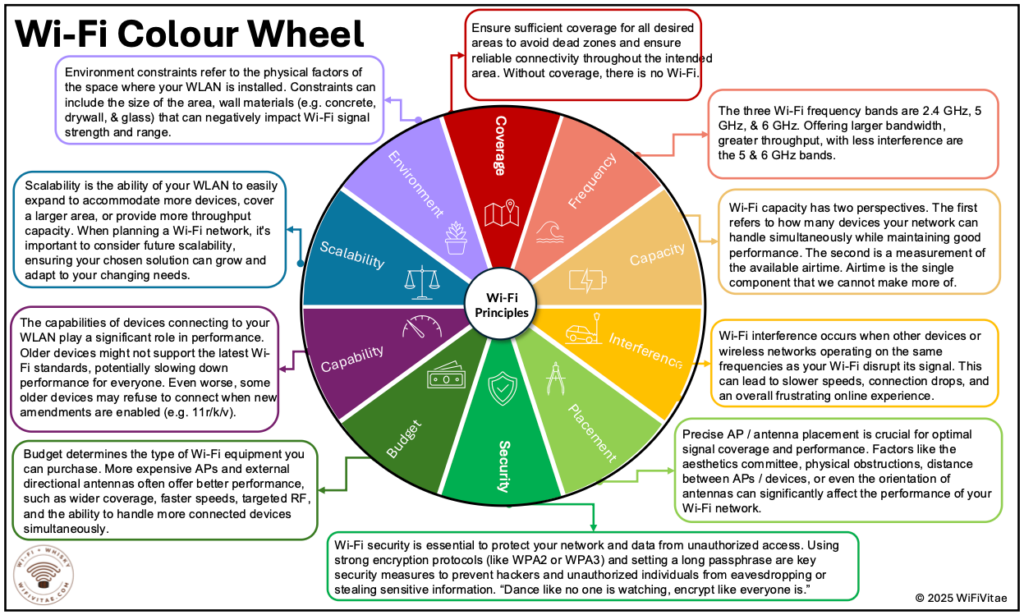
Most people experience Wi-Fi in one of two states:
- It works, and nobody thinks about it.
- It doesn’t, and suddenly it’s everyone’s problem.
That second state is where modern Wi-Fi planning often goes wrong—not because the technology is weak, but because the design and expectations are misaligned.
The Wi-Fi Colour Wheel is a helpful way to explain why. It reminds us that Wi-Fi performance isn’t determined by a single dial. Instead, it’s shaped by multiple interdependent elements: coverage, bands, capacity, placement, interference, environment, client capabilities, security, scalability, and budget.
You can optimize one slice of the wheel, but if you ignore the others, the user experience will still wobble.
Let’s walk through each part—what it means, why it matters, and what “good” looks like in practice.
1. Coverage: The Non-Negotiable Foundation
The wheel starts with the truest statement in Wi-Fi design:
“Without coverage, there is no Wi-Fi.”
Coverage is about making sure users have connectivity where they need it—without dead zones or unstable signal edges. If a space has unreliable coverage, everything else becomes irrelevant. You can have the newest Wi-Fi generation and the fastest internet pipe, but if the signal isn’t consistently there, your network will still be perceived as “bad Wi-Fi.”
What this means in real life:
- Don’t let the design start with “How many APs do we have in the budget?”
- Start with “Where must Wi-Fi work perfectly?”
2. Bands: 2.4, 5, and 6 GHz Should Be Intentional Choices
The wheel reminds us of the three main Wi-Fi bands: 2.4 GHz, 5 GHz, and 6 GHz.
In simple terms:
- 2.4 GHz effectively travels farther and penetrates obstacles better but is often crowded.
- 5 GHz typically offers a strong balance of performance and practicality.
- 6 GHz brings clean spectrum and wide channels for modern devices.
The wheel states that 5 and 6 GHz offer larger bandwidth, greater throughput, and less interference compared with 2.4 GHz.
Key takeaway:
A strong WLAN strategy doesn’t treat bands equally. It assigns them roles.
3. Capacity: Devices and Airtime
This is one of the most valuable insights in the Colour Wheel:
Wi-Fi capacity has two perspectives.
- How many devices you can handle while maintaining good performance.
- The amount of available airtime—the resource you can’t create more of.
This reframes a common misunderstanding.
A network can have coverage everywhere and still struggle because too many clients are competing for the same shared medium. Wi-Fi is not like wired networking where you can assume each user gets a dedicated lane. In wireless, everyone shares the road.
What this means in real life:
- A full stadium, busy hospital ward, or dense office requires capacity planning—not just coverage planning.
- Sometimes more APs help. Sometimes smarter channel plans and band steering help more.
4. Client Capabilities: Your Network Is Only as Modern as Its Oldest Devices
The wheel calls out a truth IT teams often learn the hard way:
Older devices may not support the latest standards, slowing performance for everyone. In worse cases, some devices may refuse to connect when newer features are enabled (e.g., 11r/k/v).
Even if your infrastructure is cutting-edge, the user experience depends heavily on what the clients can do.
What this means in real life:
- Device audits matter.
- Compatibility testing is not “extra work”—it’s risk reduction.
5. AP and Antenna Placement: Performance Is Physical
The wheel emphasizes that precise AP/antenna placement is crucial. Aesthetics committees, obstructions, distance, and antenna orientation can significantly affect the outcome.
This is where theory meets the real building.
Wi-Fi doesn’t behave nicely just because a floor plan looks tidy. Ceiling height, racking, mechanical rooms, decorative materials, and even “please hide the AP” decisions can have measurable performance costs.
What this means in real life:
- Great hardware can’t rescue poor placement.
- Placement is not a cosmetic decision—it’s an engineering decision.
6. Interference: The Invisible Accelerator of User Frustration
The wheel defines interference as disruption from other devices or networks using the same frequencies, resulting in slower speeds, drops, and frustration.
Interference is especially tricky because users often describe it as “random” or “intermittent,” which can make troubleshooting feel like chasing ghosts.
What this means in real life:
- Environments with lots of neighboring networks, IoT, or industrial equipment need proactive RF thinking.
- Measuring and planning for interference is part of good design, not just reactive support.
7. Environment Constraints: The Building Is Part of the Network
Walls and materials matter.
The wheel specifically calls out physical constraints like area size and materials such as concrete, drywall, and glass, which can reduce signal strength and range.
This is why “the same AP model in two different buildings” can produce dramatically different results.
What this means in real life:
- A warehouse, hospital, and office tower are three different Wi-Fi problems.
- Design must respect the environment, not fight it blindly.
8. Security: A Baseline of Professionalism
Wi-Fi security is essential to protect networks and data. The wheel recommends WPA2 or WPA3 and a long passphrase to prevent unauthorized access.
And it offers a perfect line for anyone writing about security:
“Dance like no one is watching, encrypt like everyone is.”
What this means in real life:
- Strong security is not optional just because performance is the loudest complaint.
- You can’t call a WLAN “modern” if it’s built on weak authentication habits.
9. Scalability: Designing for the Next Two Years, Not the Last Two
Scalability is your network’s ability to expand for more devices, more area, or more throughput. The wheel emphasizes planning for future growth from day one.
This helps avoid the painful cycle of “we just upgraded this” followed by “we already outgrew it.”
What this means in real life:
- Build designs that can evolve with new devices and higher demand.
- Good planning reduces future redesign costs.
10. Budget: The Reality That Shapes Everything Else
The wheel states that budget determines what equipment you can purchase and notes that more expensive APs and directional antennas can deliver better performance, targeted RF, and support for more devices.
This is not a pitch to overspend—it’s a reminder that expectations must match investment.
What this means in real life:
- Budget isn’t just a constraint. It’s part of the design.
- The goal is to spend wisely, not necessarily more.
The Real Lesson: It’s a Balance Problem
The Colour Wheel is valuable because it fights a common instinct: to treat Wi-Fi problems as single-cause issues.
When performance dips, you might hear:
- “We need more APs.”
- “We need Wi-Fi 7.”
- “The ISP is the problem.”
- “Users are too demanding.”
Sometimes those are true. But often the answer is more nuanced.
A healthy WLAN is usually the result of balanced decisions across the wheel:
- Coverage planned with intent.
- Bands used strategically.
- Capacity designed around airtime realities.
- Placement treated as engineering, not decoration.
- Clients considered as a major variable.
- Interference and environment respected early.
- Security and scalability built in, not bolted on later.
- Budget aligned with performance objectives.
A Simple Way to Use the Wheel
If you want a practical, repeatable approach, use the wheel as a pre-design and pre-upgrade checklist:
- Confirm coverage goals (where must it work perfectly?).
- Define band intent (what belongs on 2.4 vs 5 vs 6?).
- Estimate capacity based on concurrency and airtime reality.
- Audit client mix (what will actually connect?).
- Plan placement with the building’s constraints in mind.
- Assess interference risks proactively.
- Lock security baselines early.
- Validate scale assumptions for the next growth phase.
- Match the budget to the outcomes you’re promising.
Closing Thought
The Wi-Fi Colour Wheel is a great reminder that the best wireless networks aren’t defined by one heroic choice. They’re defined by many small, aligned decisions – design for ALL of the requirements.
When these principles are balanced, Wi-Fi becomes what it was always meant to be:
quiet, reliable, and almost invisible.
And that’s the highest compliment a network can earn.
Slàinte!