Wi-Fi Terms
Overview
This is a quick overview of basic terms used in the Wi-Fi realm. Understanding these terms enables you to quickly join a Wi-Fi conversation and address some fundamental industry-specific lingo. A lot of theory and background information goes into these concepts, and maybe, just maybe, this will give you enough detail to spark your curiosity and encourage you to dig deeper, lean in, and ask more questions to learn more about the exciting world of Wi-Fi.
Basic Concept
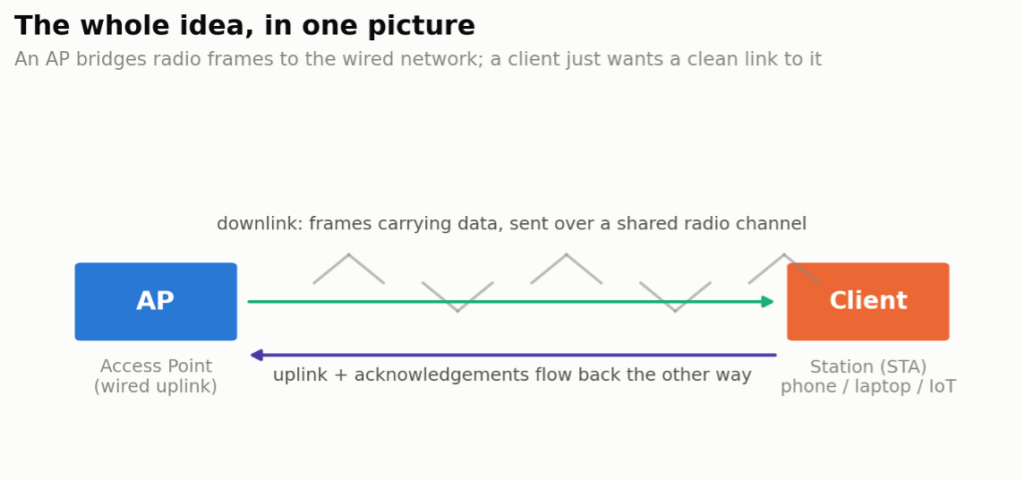
Strip away all the acronyms for a second, and Wi-Fi is a pretty simple idea: two radios agree to talk to each other over the air instead of over a wire. One of those radios — the Access Point — has the job of bridging whatever it hears over RF onto your actual network. The other — the client, or station — just wants a clean, fast, reliable link to that AP so it can get on with whatever it’s actually trying to do (stream something, back something up, or, in the case of most IoT devices, just phone home every few minutes for no good reason).
Everything else in this glossary is really just an answer to one of three questions: how do these two radios find each other, how do they share a bit of spectrum that every other device around them is also fighting for, and how do they keep the conversation both fast and honest. Keep those three questions in your back pocket and the rest of this stuff starts making a lot more sense.
Wi-Fi Term Glossary
What follows isn’t alphabetical, and it isn’t exhaustive — it’s grouped roughly by topic, because that’s how these terms actually cluster together in the real world. Pull on any one of these threads long enough and you’ll find yourself down a rabbit hole of IEEE drafts, Wi-Fi Alliance certification programs, and vendor marketing that all somehow uses the same three letters to mean three different things. Consider yourself warned.
Wi-Fi
802.11 Soup
802.11 (Prime) – original Wi-Fi standard released last century (1997), supporting data rates of 1 & 2 Mbps on the 2.4 GHz band. Wi-Fi is technology from the last century.
802.11a – first migration of Wi-Fi to the 5 GHz band, introduced OFDM.
802.11b – first speed enhancement for Wi-Fi on 2.4 GHz, adding 5.5 & 11 Mbps data rates.
802.11g – introduced OFDM to 2.4 GHz.
802.11n – Wi-Fi becomes fast and stable enough to establish itself as a primary access technology. The iPad is released without an Ethernet interface, and the trend follows across laptops. Adds features like MIMO, channel bonding, short guard intervals, spatial streams, and block ACKs. IEEE challenges itself: “What can we do to squeeze more performance out of every little piece of the 802.11 standard?” (Wi-Fi 4)
802.11ac – adds features that sound good on paper, such as 80 MHz (wave 1) & 160 MHz / MU-MIMO (wave 2). While interesting, these features were mostly useful for lab testing — in a Faraday cage, with a single client — and offered little benefit in production WLANs. (Wi-Fi 5)
802.11ax – enhanced Wi-Fi across the 2.4, 5, and 6 GHz bands. It supports OFDMA and 6 GHz — arguably the most significant single enhancement to Wi-Fi in the last 20 years. (Wi-Fi 6 & Wi-Fi 6E)
802.11ah – support for sub-1 GHz Wi-Fi for IoT devices. It offers the benefits of a common Wi-Fi stack, but the PHY layer uses 915 MHz (NA) and 868 MHz (EU).
802.11ad – Wi-Fi on the 60 GHz band.
802.11be – the latest and greatest standard/generation of Wi-Fi. Adds multi-radio MLO, puncturing, and gimmicky features like 320 MHz wide channels. (Wi-Fi 7)
802.11bn – the future of Wi-Fi, with multi-AP MLO. (Wi-Fi 8)

Here’s the generation chart, laid out properly — which amendment maps to which consumer-facing “Wi-Fi N” number, and where each one lives in the successive editions of the IEEE 802.11 spec:
| Wi-Fi Generation | Band (GHz) | 802.11 Amendment | Abbreviation | 2012 Clause | 2016 Clause | 2020 Clause |
|---|---|---|---|---|---|---|
| – | 2.4 | “Prime” | DRSS | 16 | 15 | 15 |
| – | 2.4 | 11b | HR/DSSS | 17 | 16 | 16 |
| – | 5 | 11a | OFDM | 18 | 17 | 17 |
| – | 2.4 | 11g | ERP | 19 | 18 | 18 |
| Wi-Fi | 2.4/5 | 11n | HT | 20 | 19 | 19 |
| – | 3.6 | 11y | ||||
| Wi-Fi 5 | 5 | 11ac | VHT | 21 | 21 | |
| – | 60 | 11ad | VHT in 60 GHz | |||
| – | <1 | 11ah | S1G | 23 | ||
| Wi-Fi 6 | 2.4/5 | 11ax | HE | |||
| Wi-Fi 6 | 6 | 11ax | HE | |||
| Wi-Fi 6 | 2.4/5 | 11ax | HE | |||
| Wi-Fi 7 | 2.4/5/6 | 11be | EHT | |||
| Wi-Fi 8 | 2.4/5/6 | 11bn | UHR |
The Wi-Fi Alliance’s own reference for this naming scheme is worth bookmarking:
https://www.wi-fi.org/system/files/Generational_Wi-Fi_User_Guide_202304.pdf
Organizations
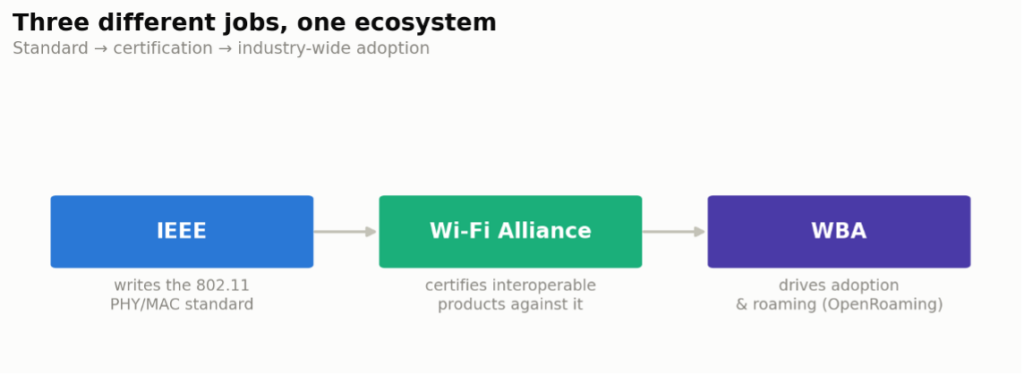
IEEE (Institute of Electrical and Electronics Engineers) is a professional club for electronics and electrical engineering geeks. The IEEE develops the standards that define layer 1 and 2 operations of wireless LANs as part of the 802.11 working group.
Wi-Fi Alliance is a global organization that promotes Wi-Fi technology and certifies devices for seamless interoperability, security, and performance. Founded in 1999, the certification program helps ensure that Wi-Fi is widely accessible and trustworthy for consumers and businesses worldwide. (Originally called WECA — Wireless Ethernet Compatibility Association — even though Wi-Fi has nothing to do with Ethernet.)
The Wireless Broadband Alliance (WBA) is an industry organization that advances seamless, secure, and high-quality wireless broadband experiences. Established in 2003, the WBA brings together technology companies, service providers, and equipment manufacturers to promote Wi-Fi and other wireless broadband technologies. Its role is to drive global adoption, interoperability, and innovation in wireless networks. The WBA’s initiatives, such as Wi-Fi OpenRoaming, enhance public and private wireless networks, ensuring seamless connectivity, improving user experiences, and fostering collaboration between mobile and Wi-Fi services.
RF Fundamentals
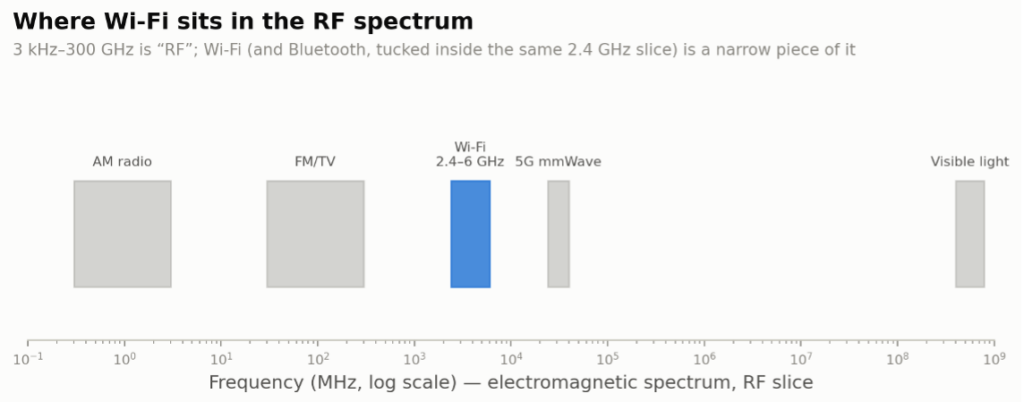
RF (Radio Frequency) refers to the range of electromagnetic waves typically used for wireless communication, such as radio, TV, cell phones, and Wi-Fi. RF waves fall between 3 kHz and 300 GHz in the electromagnetic spectrum. These frequencies carry data through the air by modulating the signal, allowing devices like radios or wireless access points to transmit and receive information without hard-wired connections. The ability to transmit over various distances, through walls, and across open spaces makes RF essential for modern wireless communication systems.
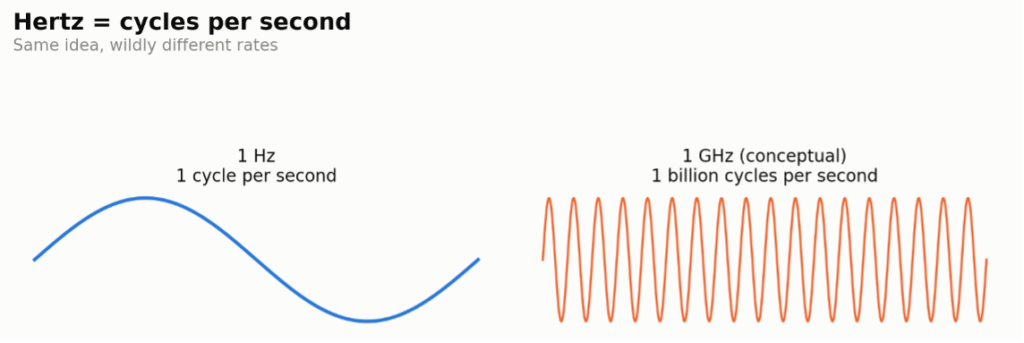
Hertz is the unit of frequency, measuring the number of cycles or repetitions of a periodic event per second. Hertz describes how often a wave oscillates per second in the context of electromagnetic waves, like radio and Wi-Fi signals. For example, a 1 Hz frequency means one cycle per second, while 1 GHz (gigahertz) equals one billion cycles per second. Named after physicist Heinrich Hertz, this unit is fundamental to understanding signal frequency and is widely used in fields like telecommunications, audio, and physics to describe wave behaviours. At the beginning of the 20th century, RF waves were referred to as “Hertzian waves.”
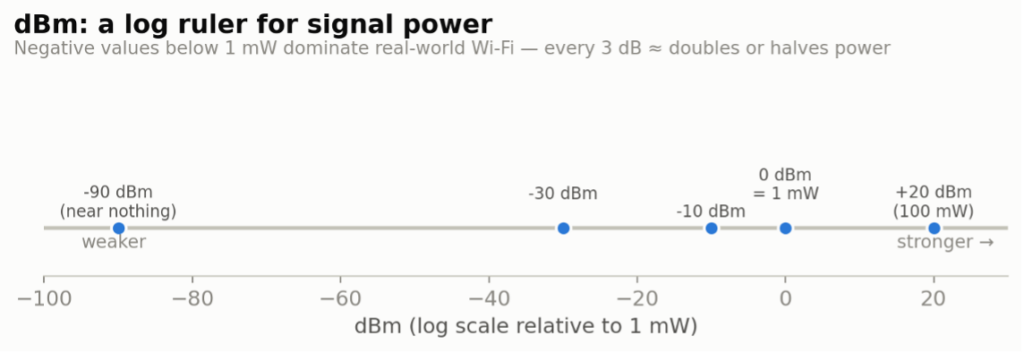
dBm (decibel-milliwatts) is a power unit that represents the strength of a signal, referenced to one milliwatt (mW) [0 dBm = 1 mW]. Positive dBm values indicate power above 1 mW, while negative values indicate power below 1 mW. For example, -30 dBm is a weaker signal than -10 dBm. This unit allows a more manageable way to measure and compare signal strengths over a wide range of values, especially for Wi-Fi applications.
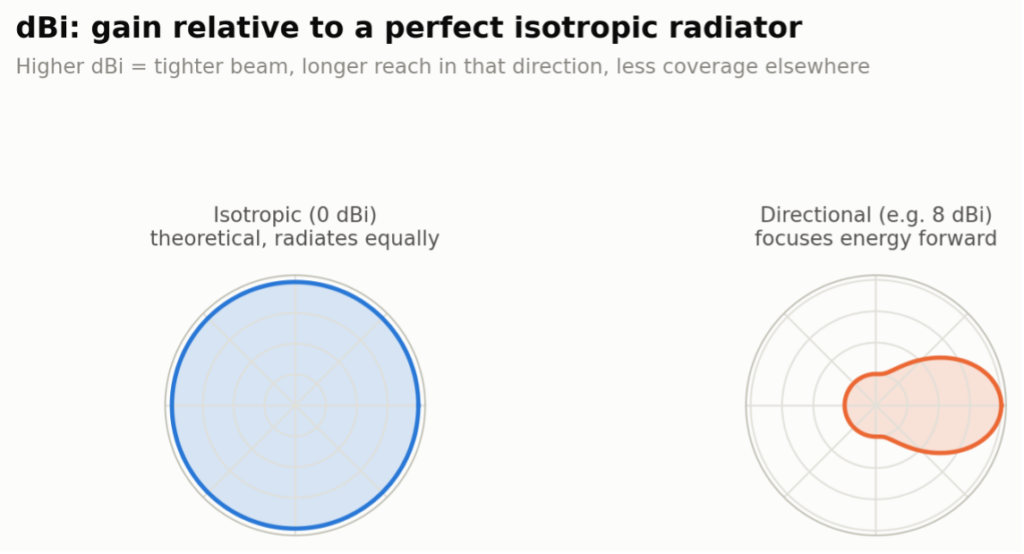
dBi (decibel-isotropic) is a unit that measures the gain or directivity of an antenna relative to an ideal isotropic antenna, which radiates power equally in all directions. An antenna with higher dBi focuses the signal more effectively in a specific direction, which can improve range and signal quality. dBi is crucial in wireless network design, helping engineers select antennas that optimize signal coverage and performance for specific environments. One wrinkle worth knowing: antenna gain is sometimes quoted in dBd (relative to a reference dipole) instead of dBi. Since a dipole itself has about 2.14 dBi of gain over a true isotropic radiator, converting is simple — dBi = dBd + 2.14. If a datasheet’s numbers look oddly low compared to a competitor’s, check which reference they used before assuming one antenna is worse than the other.
(M|G)bps – the unit that matters here is bits per second (bps). The leading letter signals the magnitude using a metric scale. This is another example of why the metric system makes more sense and is already adopted by every country, whether they’re willing to accept it or not.
Here’s my own version of the metric prefix chart — the full run from yotta down to yocto, for whenever a spec sheet throws a prefix at you that you haven’t seen since a physics class you’d rather forget:
| Prefix | Symbol | Multiplier | Exponential |
|---|---|---|---|
| yotta | Y | 1,000,000,000,000,000,000,000,000 | 1024 |
| zetta | Z | 1,000,000,000,000,000,000,000 | 1021 |
| exa | E | 1,000,000,000,000,000,000 | 1018 |
| peta | P | 1,000,000,000,000,000 | 1015 |
| tera | T | 1,000,000,000,000 | 1012 |
| giga | G | 1,000,000,000 | 109 |
| mega | M | 1,000,000 | 106 |
| kilo | k | 1,000 | 103 |
| hecto | h | 100 | 102 |
| deca | da | 10 | 101 |
| (base) | 1 | 100 | |
| deci | d | 0.1 | 10-1 |
| centi | c | 0.01 | 10-2 |
| milli | m | 0.001 | 10-3 |
| micro | μ | 0.000001 | 10-6 |
| nano | n | 0.000000001 | 10-9 |
| pico | p | 0.000000000001 | 10-12 |
| femto | f | 0.000000000000001 | 10-15 |
| atto | a | 0.000000000000000001 | 10-18 |
| zepto | z | 0.000000000000000000001 | 10-21 |
| yocto | y | 0.000000000000000000000001 | 10-24 |
FSPL (Free Space Path Loss) is the weakening of a radio signal as it travels through free space, such as air or a vacuum, without obstacles. It occurs because the signal spreads out over a larger area as the distance from the transmitter increases. FSPL is influenced by both the frequency of the signal and the distance between the transmitter and receiver. Based on the FSPL formula, higher frequencies experience greater loss for the same distance.
The formula, in the form most people actually use in the field (distance in km, frequency in MHz):
FSPL (dB) = 20 log₁₀(distance in km) + 20 log₁₀(frequency in MHz) + 32.44

Wi-Fi Network Fundamentals
Client (or Station) is the device on the other end of the link from the AP — your phone, laptop, thermostat, whatever. In the 802.11 spec it’s formally called a STA (station), and you’ll see “client” and “STA” used interchangeably in the wild. Every AP is, technically, also a STA — it’s just a STA that’s also bridging traffic onto a wired network.
AP (Access Point) is a device that bridges wireless devices to a wired network using Wi-Fi. Access points are commonly used in homes, businesses, and public spaces to provide Wi-Fi coverage, allowing multiple devices — like smartphones, laptops, and tablets — to connect wirelessly. APs are essential for expanding network coverage, enabling seamless connectivity in larger areas and improving overall network performance.
SSID (Service Set Identifier) is the unique name assigned to a Wi-Fi network that humans use to identify and connect to it. When scanning for available networks, users see each network’s SSID, allowing them to select the correct one. SSIDs help differentiate among multiple Wi-Fi networks, especially in areas with overlapping signals, such as apartments (MDUs) or offices. They can be up to 32 characters long and can be customized by network administrators to make it easier for users to recognize specific networks.
BSSID (Basic Service Set Identifier) is a unique identifier for a specific Wi-Fi radio in a network. It is typically an offset based on the MAC address of the AP’s radio interface. The BSSID helps devices distinguish between different radios or SSIDs on the same network. For example, in a large office or campus, each AP radio will have its own BSSID, even if they all share the identical SSID, allowing devices to connect to the most appropriate radio based on factors such as signal strength.
BSS (Basic Service Set) is the fundamental building block of a Wi-Fi network, consisting of a single AP and the devices (clients) connected to it. Each BSS is identified by a unique BSSID, typically the MAC address of the AP, which helps devices recognize and connect to the correct network. In environments with multiple access points, multiple BSSs work together to provide seamless coverage, forming an ESS. The BSS structure enables devices to communicate within a specific network, facilitating data transmission and network management.
ESS (Extended Service Set) is a Wi-Fi network structure that combines multiple Basic Service Sets (BSSs), allowing devices to move seamlessly between access points while staying connected to the same network. Each BSS has its own access point radio and unique BSSID within an ESS, but all BSSs share the same SSID. This setup provides broader coverage across larger areas, such as offices or campuses, and enables devices to “roam” between access points without losing connection. ESS ensures a consistent and unified Wi-Fi experience across multiple access points within a single network.

Spectrum & Bands
ISM (Industrial, Scientific, and Medical) band is a set of radio frequency bands reserved internationally for non-commercial use in industrial, scientific, and medical applications. Devices like microwaves, medical equipment, and wireless technologies (such as Wi-Fi and Bluetooth) operate in these bands because they don’t require a license. However, they still follow regulatory standards to minimize interference. The most common ISM band in Wi-Fi is 2.4 GHz. These bands help facilitate wireless communication in consumer and industrial settings without requiring dedicated frequencies for each application.
U-NII (Unlicensed National Information Infrastructure) bands are specific frequency ranges in the 5 GHz and 6 GHz spectrum allocated for unlicensed wireless use in the U.S. (This is a US-based term.) These bands are widely used for Wi-Fi networks, providing several channels for high-speed, low-interference communication. The system is divided into sub-bands (U-NII-1 through U-NII-8), each with different regulations around power levels and indoor/outdoor use to minimize interference with other services. U-NII bands support Wi-Fi 5, Wi-Fi 6, and Wi-Fi 6E/7, enhancing network performance and capacity in consumer and enterprise settings.
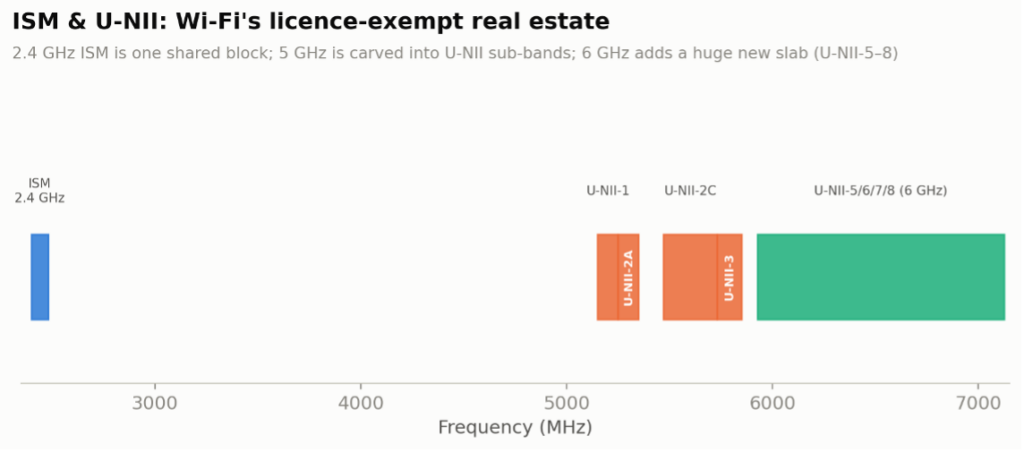
The 6 GHz frequency band offers more channels, reduced interference, and higher data rates compared to the traditional 2.4 GHz and 5 GHz bands. With 6 GHz Wi-Fi, users benefit from faster speeds, lower latency, and improved performance, especially in high-density environments with many devices. This expanded spectrum reduces network congestion, supports bandwidth-intensive applications such as virtual reality, 4K streaming, and large file transfers, and enables more reliable connections across modern Wi-Fi networks.
LPI (Low Power Indoor) 6 GHz Wi-Fi rule allows Wi-Fi devices to operate in the 6 GHz frequency band, but only at reduced power levels and exclusively indoors. This rule was introduced to ensure that Wi-Fi can utilize the expanded 6 GHz spectrum without causing interference to existing services, such as satellite or emergency communication systems, which also operate in this band. LPI 6 GHz Wi-Fi enables faster speeds, lower latency, and more capacity for modern devices while maintaining safe and efficient spectrum sharing with other users. It is a key part of Wi-Fi 6E and future Wi-Fi standards.
SP (Standard Power) 6 GHz Wi-Fi rule allows Wi-Fi devices to operate at higher power levels in the 6 GHz frequency band, with certain restrictions to prevent interference with other services, such as satellite or public safety systems. Unlike LPI devices, SP devices can be used outdoors or in larger spaces, but require an AFC system. The AFC ensures that these devices don’t interfere with licensed users by dynamically managing which parts of the 6 GHz band they can use. This rule enables broader Wi-Fi coverage and improved performance in the expanded 6 GHz spectrum, supporting Wi-Fi 6E and future Wi-Fi based technologies.
VLP (Very Low Power) 6 GHz Wi-Fi rule allows Wi-Fi devices to operate at extremely low power levels in the 6 GHz band, making them suitable for close-range, portable, or wearable applications. VLP devices can be used indoors and outdoors without requiring an AFC system. The low power limits are set to prevent interference with other users of the 6 GHz spectrum, such as satellite and emergency communications. VLP Wi-Fi enables ultra-low-power applications, such as AR/VR devices or IoT systems, to benefit from the faster speeds and additional capacity that the 6 GHz band provides.
GVP (Geofenced Variable Power) is the newest 6 GHz power class, adopted by the FCC in a Report and Order in January 2026 as a fourth way to carve up the band’s headroom. Where SP leans on an AFC database lookup to avoid licensed incumbents, GVP devices instead use their own geolocation and a geofencing system to steer clear of exclusion zones around licensed fixed microwave links and radio astronomy sites — no AFC query required. That buys real extra power over VLP: up to 24 dBm EIRP and 11 dBm/MHz PSD, against VLP’s 14 dBm EIRP and -5 dBm/MHz, while still allowing indoor or outdoor operation. The tradeoffs: GVP is confined to the U-NII-5 and U-NII-7 sub-bands only, and client devices must stay at least 6 dB below whatever power the AP is authorized to use. In practice, expect GVP to show up in higher-power outdoor hotspots, fixed wireless links, and AR/VR gear that wants more range than VLP without SP’s AFC overhead. (GVP could just as easily stand for “Give Vendors Power” — the acronym soup in this band shows no signs of running out.)

Signal Quality
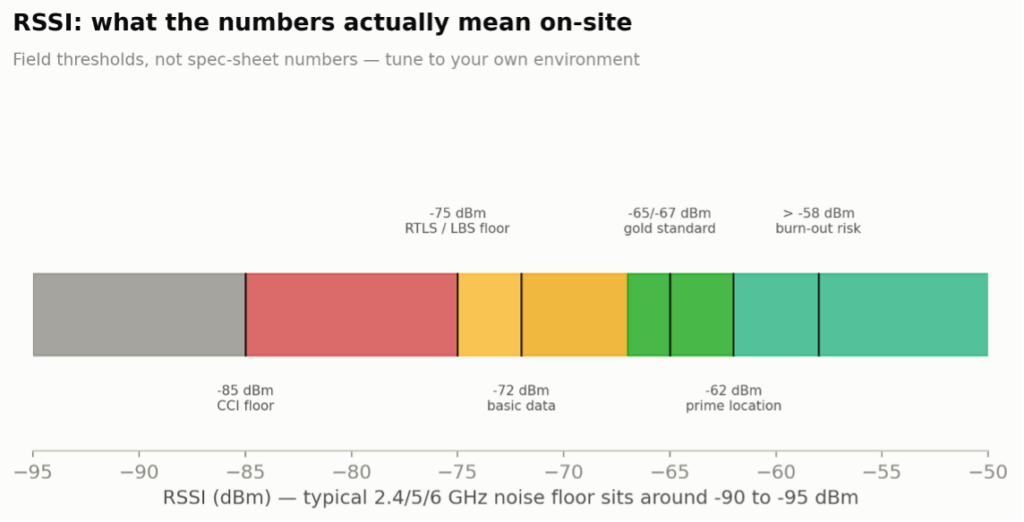
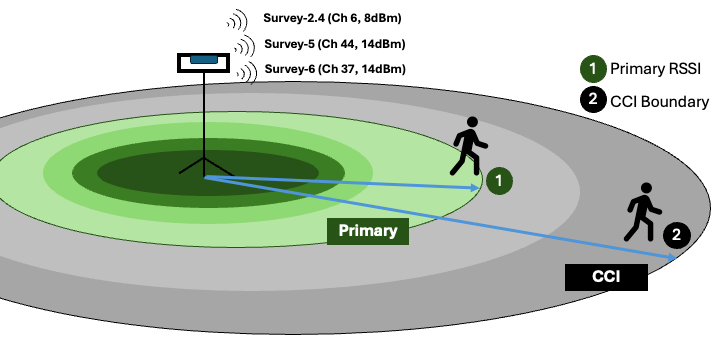
RSSI — Received Signal Strength Indicator (RSSI) measures the power level that a wireless device receives from a signal, indicating the signal strength at that device’s location. RSSI values are typically measured in negative dBm, with higher (closer to 0) values representing stronger signals (e.g., -30 dBm is stronger than -80 dBm). This metric is commonly used in Wi-Fi to assess connection quality; stronger RSSI indicates more reliable data transmission and better overall performance. Monitoring RSSI helps network administrators optimize coverage and troubleshoot connectivity issues.
What the numbers actually mean once you’re standing in the building with a survey tool in hand: above -58 dBm you’re often close enough to risk receiver “burn-out” on some radios; -62 dBm is prime, near-the-AP territory; -65 to -67 dBm is the gold standard for voice and video; -72 dBm is fine for basic data; -75 dBm is about the floor for RTLS/location-based services; and by -85 dBm you’re deep into co-channel interference risk. The noise floor on a typical 2.4/5/6 GHz radio sits somewhere around -90 to -95 dBm — below that, you’re not hearing anything, you’re just hearing the radio itself.
SNR — Signal-to-Noise Ratio (SNR) measures signal quality by comparing the strength of a desired signal to the background noise. Represented in decibels (dB), a higher SNR means a clearer signal, as there is more signal strength relative to noise. For example, a high SNR in Wi-Fi enables more complex modulation, resulting in faster speeds and more reliable connections. At the same time, a low SNR indicates potential interference or poor quality, reducing performance and requiring more robust modulation. SNR is crucial in wireless communications, as it significantly impacts data transmission quality and network efficiency.
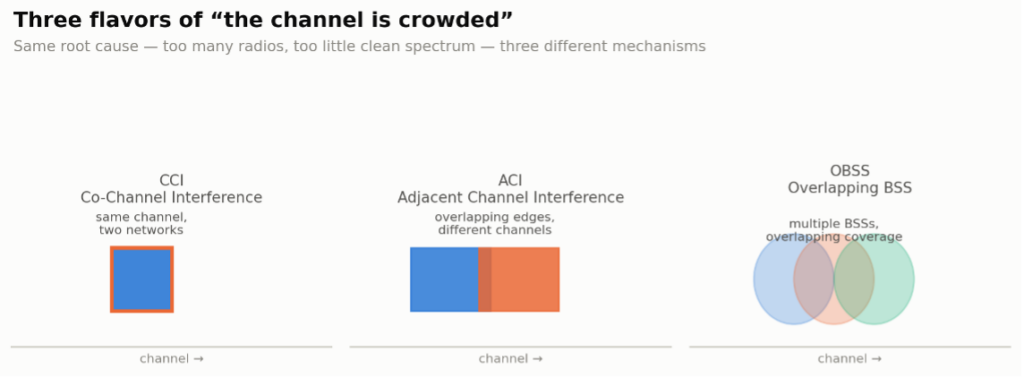
CCI (Co-Channel Interference) occurs when multiple devices or access points operate on the same frequency channel, causing them to compete for bandwidth and resulting in slower speeds and reduced performance. In Wi-Fi networks, CCI occurs when nearby routers use the same channel, forcing devices to wait for a clear signal because Wi-Fi is a “listen-before-talk” (LBT) protocol. This interference can degrade connection quality, particularly in densely populated environments with numerous overlapping networks. Proper channel planning and the use of non-overlapping channels help reduce CCI and improve network performance.
ACI (Adjacent Channel Interference) occurs when signals from nearby channels overlap, degrading wireless communication quality. Unlike CCI, which occurs on the same channel, ACI happens on different but overlapping channels, resulting in signal “bleed” and disrupting data transmission. This is particularly common in Wi-Fi networks where neighbouring channels are used in proximity, such as in the 2.4 GHz band. ACI can be minimized by selecting non-overlapping channels and carefully planning channel allocation, thereby maintaining clearer, more stable connections.
OBSS (Overlapping Basic Service Sets) occurs when multiple Wi-Fi networks, each with its own BSS, operate on the same or overlapping channels in the same area. This overlap can increase interference and reduce network performance as devices contend for bandwidth. OBSS is especially common in high-density areas, such as apartment buildings or office complexes, where multiple Wi-Fi networks coexist. Techniques such as BSS colouring in Wi-Fi 6+ help mitigate OBSS issues by marking frames to differentiate between networks, reducing interference, and improving overall network efficiency.
MIMO & Antenna Technology
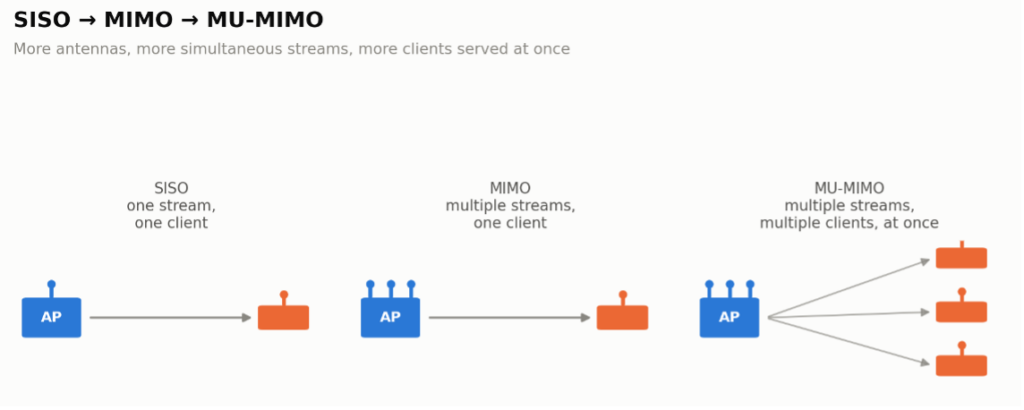
SISO (Single-Input, Single-Output) is a wireless communication technique with a single antenna at both the transmitter and the receiver. SISO transmits one data stream at a time, which is straightforward and requires minimal hardware, making it efficient for low-power devices or simpler applications. However, SISO is limited in speed and range compared to more advanced technologies, such as MIMO, which utilizes multiple antennas to increase data rates and reliability. SISO is typically used in older Wi-Fi standards or less demanding wireless applications.
MIMO (Multiple Input Multiple Output) is a wireless communication technology that utilizes multiple antennas at both the transmitter and receiver to enhance data transmission and reception. MIMO increases the capacity, speed, and reliability of wireless networks by sending and receiving multiple data streams simultaneously over the same frequency. This technology reduces interference, boosts signal quality, and enables higher data rates. It is essential to modern Wi-Fi standards (like Wi-Fi 6) and cellular networks (4G and 5G). MIMO helps achieve better performance, especially in environments with many devices or obstacles. (Side note: in September 2004, the IEEE officially voted that the standard pronunciation of MIMO will be “my-moe,” not “mee-moe.” It must have been a slow day, with not much else to vote on.)
https://grouper.ieee.org/groups/802/11/Minutes/Cons_Minutes_Sept-2004.pdf
MU-MIMO (Multi-User Multiple Input Multiple Output) is an advanced wireless technology that enables a router or access point to communicate with multiple devices simultaneously, rather than one at a time. Unlike traditional MIMO, where a single user benefits from multiple data streams, MU-MIMO enables multiple users to receive their own data streams at the same time. This enhances the efficiency and capacity of Wi-Fi networks, reducing congestion and improving performance, particularly in environments with numerous connected devices. MU-MIMO is a key feature in modern Wi-Fi standards, such as Wi-Fi 5 (optional) and Wi-Fi 6 (mandatory).
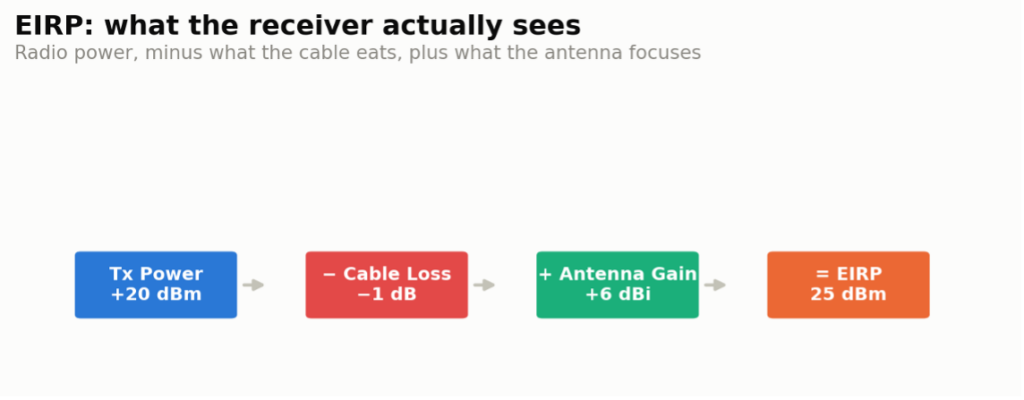
EIRP (Effective Isotropic Radiated Power) is the total power a wireless antenna system radiates in a specific direction, accounting for the transmitter’s power and the antenna’s gain. It represents the maximum strength of the signal emitted if the system radiated energy equally in all directions (isotropic). EIRP is a key measure in wireless communications, as it helps determine the range of a signal and ensures compliance with regulatory limits on transmission power, particularly in Wi-Fi, cellular, and satellite networks.
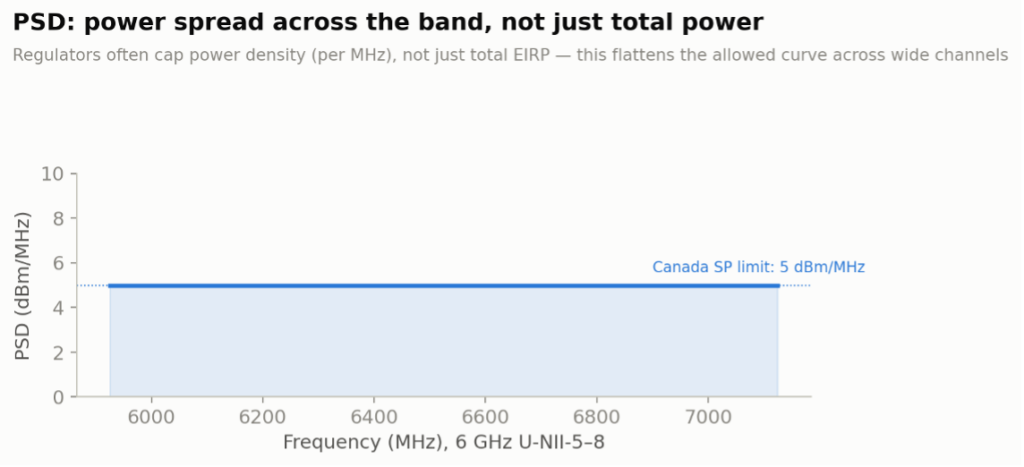
PSD (Power Spectral Density) measures the power distribution of a signal across different frequencies, indicating the amount of power present within each frequency interval. PSD is usually expressed in power units per hertz (e.g., dBm/Hz or dBm/MHz) and helps engineers understand signal strength and bandwidth usage across the frequency spectrum. In wireless communication, PSD analysis is essential for optimizing signal clarity, minimizing interference, and ensuring compliance with regulatory power limits. This concept shows up constantly in the 6 GHz regulatory rules — for example, in Canada, standard power (SP) radios are limited to 5 dBm/MHz, which flattens the power budget across a wide channel instead of letting all of it stack up in one place.
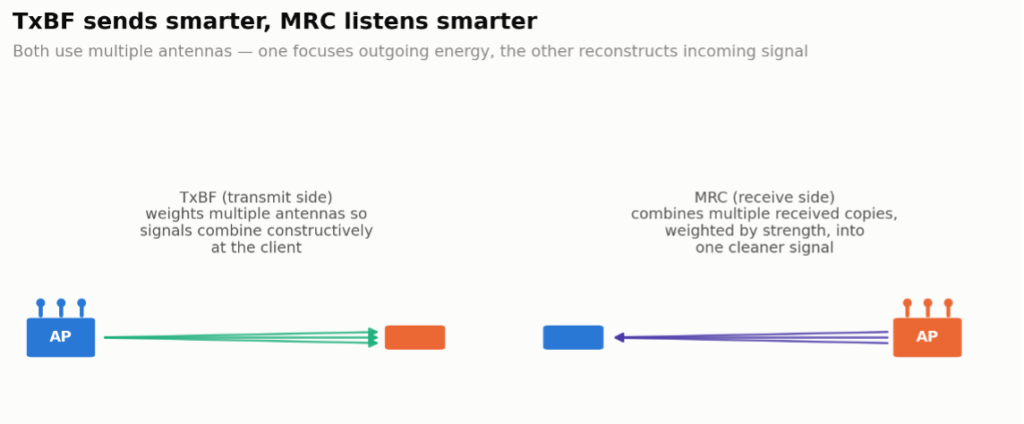
TxBF (Transmit Beamforming) is a wireless communication technique that improves signal quality and range by directing the transmission signal toward the receiving device rather than broadcasting it in all directions. Using multiple antennas, TxBF creates constructive interference, focusing the signal and boosting its strength at the receiver’s location. This enhances connection reliability, reduces interference, and increases data rates, especially in environments with obstacles or multiple devices. TxBF is commonly used in advanced Wi-Fi standards, like Wi-Fi 5 and Wi-Fi 6, to optimize network performance.
MRC (Maximal Ratio Combining) is a signal processing technique used in wireless communications to improve signal quality and reliability. MRC combines multiple copies of a signal received by different antennas, each weighted according to its strength, so stronger signals contribute more to the final output. This method helps to reduce the impact of interference, fading, and noise, ultimately enhancing the quality and stability of the connection. MRC is commonly used in systems with multiple antennas, such as MIMO, to perform better in challenging environments.
Spread Spectrum & Modulation
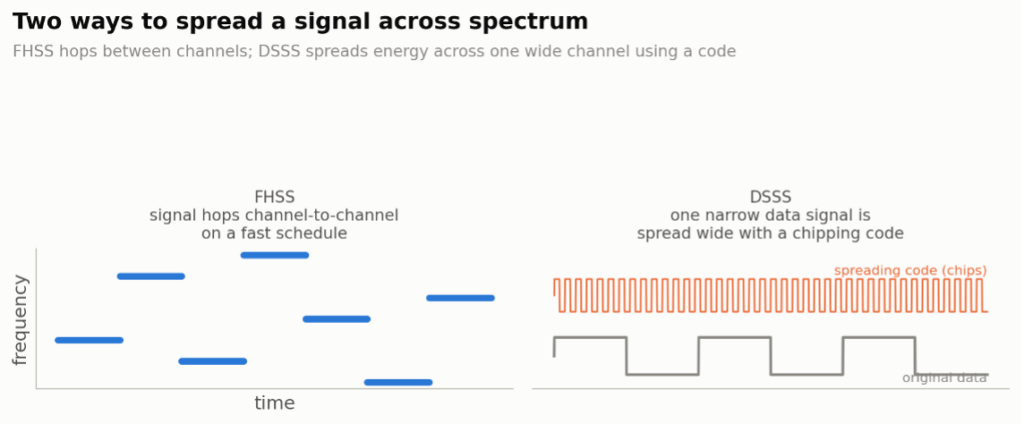
FHSS (Frequency Hopping Spread Spectrum) is a wireless communication technique that rapidly changes the frequency of the transmitted signal across a set range of frequencies. This “hopping” reduces interference and improves security by making it harder for unauthorized receivers to intercept or jam the signal. FHSS is commonly used in Bluetooth and other low-power wireless technologies, especially in environments with multiple devices, as it minimizes interference by spreading the signal over multiple channels. Its resilience to interference and eavesdropping makes FHSS particularly useful in dense or secure communication settings.
DSSS (Direct Sequence Spread Spectrum) is a wireless communication technique that spreads a signal over a wider frequency band than necessary, embedding it with a unique code. This process makes the signal more resistant to interference and noise, as only receivers with the correct code can decode the transmission. DSSS enhances signal security and reliability, particularly in environments prone to interference. It was used in earlier Wi-Fi standards (like 802.11b) and remains useful in various wireless applications due to its ability to enhance data integrity across a broad range of frequencies.
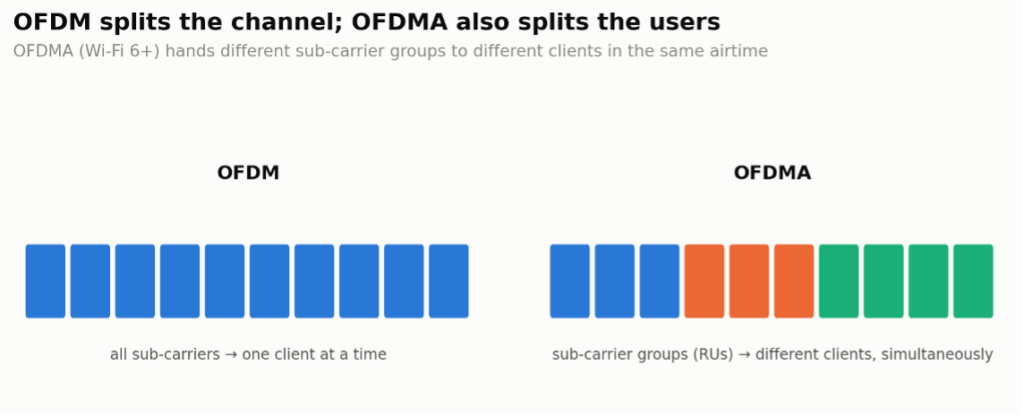
OFDM (Orthogonal Frequency Division Multiplexing) is a digital modulation technique used in many wireless communication systems, including Wi-Fi, 4G, and 5G networks. It splits a signal into smaller sub-signals, each of which is modulated on a different frequency. These sub-signals are transmitted simultaneously, reducing interference and improving data transmission efficiency. OFDM helps utilize available bandwidth more effectively and provides more reliable communication, especially in environments with high interference or obstacles. It is crucial in enabling faster data rates and greater network capacity.
OFDMA (Orthogonal Frequency Division Multiple Access) is an advanced wireless communication technology used in systems like Wi-Fi 6 and 5G. It builds on OFDM by allowing multiple users or devices to share the same channel simultaneously. In OFDMA, the available frequency is divided into smaller sub-channels, and each user is assigned a specific portion, allowing for more efficient bandwidth utilization. This enhancement improves network performance, reduces latency, and increases capacity, particularly in environments with numerous connected devices, making it ideal for modern high-density wireless networks.
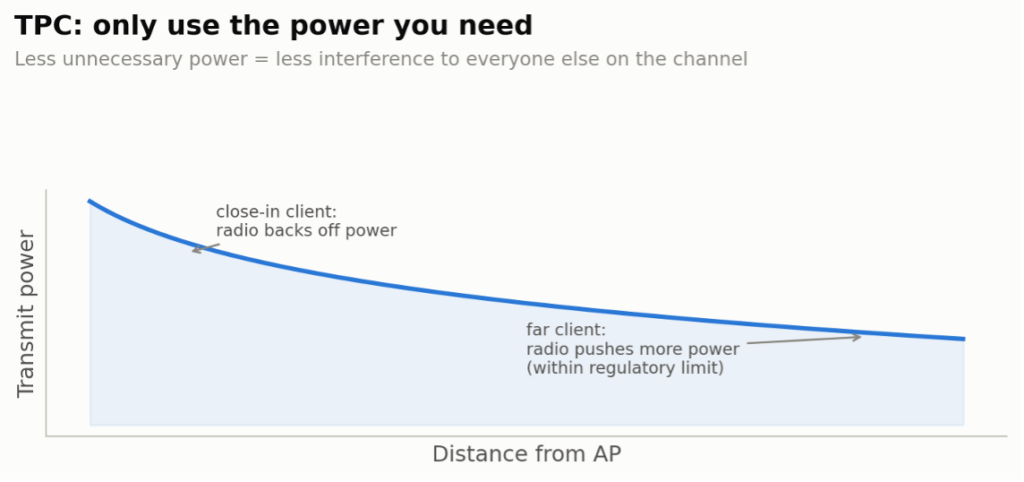
TPC (Transmit Power Control) is a technique used in wireless communication systems to adjust the power output of a transmitter based on the signal strength needed for reliable communication. By automatically adjusting transmit power based on distance from the receiver, TPC helps optimize battery life, minimize interference with nearby devices, and comply with regulatory limits on transmission power. TPC is commonly used in Wi-Fi, cellular networks, and other wireless technologies to maintain effective communication while conserving power and minimizing environmental interference.
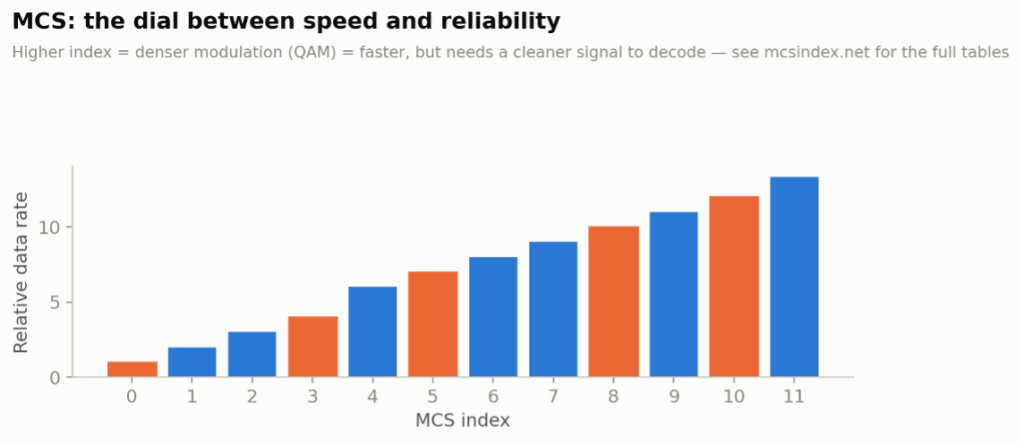
MCS (Modulation and Coding Scheme) is a parameter in wireless communication that defines the data rate of a transmission based on the modulation type and error-correcting code rate. The MCS level affects the balance between speed and reliability: higher MCS values use more complex modulation (such as 256-QAM) for faster data rates but require stronger signal conditions, while lower MCS values prioritize robustness over speed in weaker signal conditions. MCS is integral to modern Wi-Fi and cellular networks, enabling devices to dynamically adjust transmission rates based on signal quality, thereby maintaining optimal performance. Check out mcsindex.net if you ever need the full table in front of you. Also check out MCSINDEX.net or the interactive tool at SemFio Networks – Wi-Fi MCS Index.
ASK (Amplitude Shift Keying) is a digital modulation technique where the amplitude (signal strength) of a carrier wave is varied to represent binary data (1s and 0s). In ASK, different amplitudes correspond to different binary values, allowing the signal to encode information. This simple method is used in various communication systems, especially where bandwidth is limited. While ASK is efficient and easy to implement, it is more susceptible to noise and interference than other modulation methods, making it most suitable for short-range or controlled environments.
FSK (Frequency Shift Keying) is a digital modulation technique in which the frequency of a carrier wave is varied to represent binary data (1s and 0s). In FSK, distinct frequencies correspond to different binary values, allowing information to be transmitted over a wireless or wired medium. FSK is commonly used in applications like radio, Bluetooth, and low-power communication systems due to its simplicity and resistance to noise. Its robustness makes FSK effective in environments with moderate interference, though it generally provides lower data rates than more advanced modulation techniques.
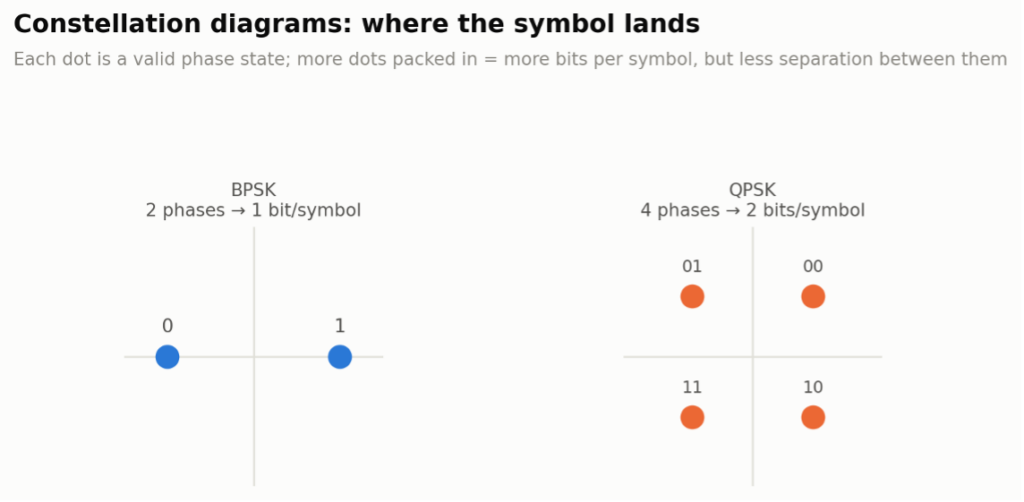
PSK (Phase Shift Keying) is a digital modulation technique in which the phase of a carrier signal is shifted to represent binary data, with different phases corresponding to different binary values. For example, BPSK uses two phases to represent 1s and 0s, while QPSK uses four phases for higher data rates. PSK is widely used in wireless and satellite communications because it is relatively robust against noise and can efficiently transmit data over various distances. It balances complexity, data rate, and signal reliability well.

Modulation is the modification of a carrier signal to encode information for transmission. This is achieved by modifying aspects of the signal, such as its amplitude, frequency, or phase, to represent data (such as voice, video, or binary data). Modulation enables effective communication over various mediums — such as radio, cable, or fibre — allowing the signal to travel longer distances, fit within available bandwidth, and resist interference. Different modulation techniques, such as Amplitude Modulation (AM), Frequency Modulation (FM), and Phase Modulation (PM), are chosen based on factors like data rate, range, and noise resilience.
BPSK (Binary Phase Shift Keying) is a fundamental digital modulation technique in which the phase of a carrier signal is shifted between two distinct values (typically 0° and 180°) to represent binary data, with each phase corresponding to either 1 or 0. BPSK is a robust and straightforward modulation technique that effectively transmits data in environments with noise or interference. However, because it only uses two phases, it has a lower data rate than more complex modulation schemes. BPSK is commonly used in wireless communication systems where reliability is prioritized over speed, such as in satellite and some Wi-Fi applications.
QPSK (Quadrature Phase Shift Keying) is a digital modulation technique that uses four distinct phase shifts (usually 0°, 90°, 180°, and 270°) to represent two bits of data per symbol. By encoding two bits at once, QPSK achieves a higher data rate than BPSK while maintaining similar noise resilience. This balance between efficiency and reliability makes QPSK a widely used modulation scheme in wireless communication systems, including cellular networks and Wi-Fi, where moderate data rates and robust signal quality are essential.
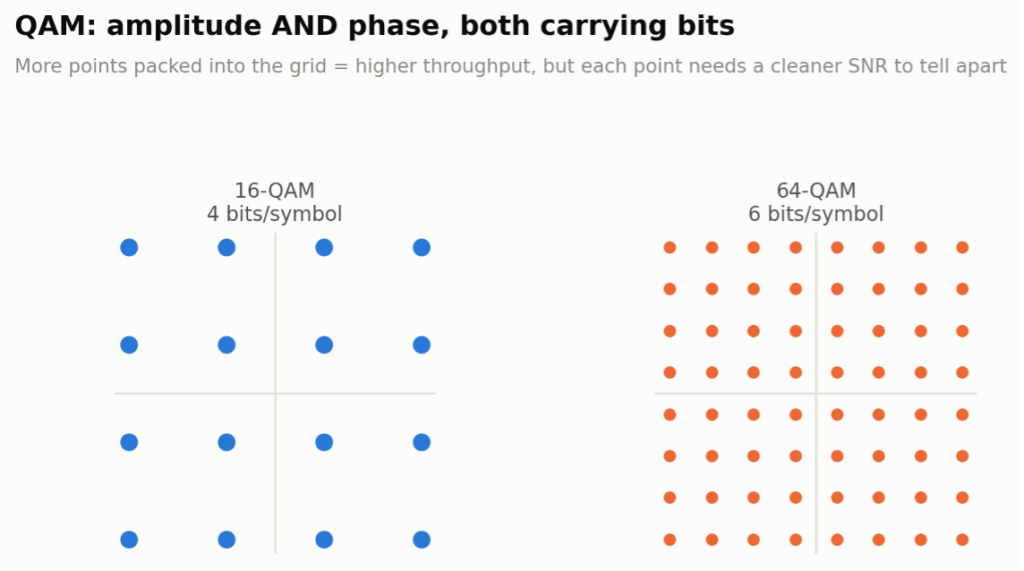
QAM (Quadrature Amplitude Modulation) is a digital modulation technique that combines amplitude and phase modulation to encode data, enabling the transmission of multiple bits per symbol. Different amplitude levels and phase shift combinations in QAM represent unique binary patterns, enabling high data rates. For example, 16-QAM and 64-QAM use 16 and 64 different symbol states, respectively, to represent data. QAM is widely used in Wi-Fi, cable, and cellular networks, as it efficiently increases data throughput. However, higher QAM levels require a more substantial signal-to-noise ratio (SNR) to maintain reliability.
Security
Open networks require no authentication and no encryption — any device can associate, and every frame travels over the air in the clear. Convenient for a coffee shop, terrible for anything you’d mind a stranger reading over your shoulder.
OWE (Opportunistic Wireless Encryption) is a security feature in Wi-Fi that provides encrypted connections on open networks where passwords aren’t required for access. With OWE, users can join a network without entering a password, but their connections are still encrypted. This ensures privacy and security by preventing others on the same network from eavesdropping on their data. OWE is especially useful in public Wi-Fi environments, offering an extra layer of protection compared to traditional open networks. It’s part of the Wi-Fi Alliance’s Wi-Fi CERTIFIED Enhanced Open™ program — “Enhanced Open” is simply the WFA’s marketing name for OWE, so the two terms describe the exact same thing rather than two different features.
WEP (Wired Equivalent Privacy) is an outdated security protocol initially designed to provide privacy for Wi-Fi networks, aiming to make wireless connections as secure as wired ones. WEP uses encryption to protect data transmitted between devices on the network. However, due to weaknesses in its encryption algorithm, WEP is vulnerable to hacking and can be easily breached. Modern Wi-Fi networks now use more secure protocols, such as WPA2 and WPA3, as WEP has been considered insufficient for protecting wireless communications for some time.
WPA (Wi-Fi Protected Access) is a security protocol for Wi-Fi networks developed to address the vulnerabilities of the older WEP standard. Introduced in 2003, WPA uses TKIP to change encryption keys, dynamically improving data protection and security. It also includes message integrity checks to prevent attackers from altering packets sent over the network. WPA was intended as a temporary measure to improve wireless security until WPA2 could be fully adopted.
WPA2 (Wi-Fi Protected Access [version] 2) is a security protocol for Wi-Fi networks that provides strong data encryption and user authentication to protect wireless communications. Introduced in 2004, WPA2 is widely used in personal and enterprise networks to safeguard data transmitted over Wi-Fi, prevent unauthorized access, and ensure data privacy. However, WPA2 is ultimately vulnerable to offline, brute-force, and dictionary attacks, making it just a matter of time before the keys are cracked.
WPA3 (Wi-Fi Protected Access [version] 3) is the latest security protocol for Wi-Fi networks. It enhances protection through stronger encryption and improved authentication methods. Introduced in 2018, WPA3 features include individualized data encryption — even on open networks — and a more secure handshake process called SAE, which prevents brute-force attacks. It also offers enhanced protection for IoT devices and higher security for enterprise environments. Overall, WPA3 aims to provide a more secure and private Wi-Fi experience, particularly in environments with heightened security requirements.

MFP (Management Frame Protection) is a security feature in Wi-Fi networks designed to protect management frames, which are essential for network operations such as authentication and association. Without MFP, these frames are vulnerable to attacks, such as de-authentication attacks, where an attacker forces devices off the network. MFP ensures that management frames are encrypted and authenticated, reducing the risk of interference and unauthorized disconnections.
One thing worth flagging — the same point that came up in a WLPC talk once and derailed a perfectly good coffee break: IEEE and the Wi-Fi Alliance don’t always use the same name for the same feature. MFP is the Wi-Fi Alliance’s marketing term; the underlying IEEE amendment is 802.11w. Same story with roaming — “Fast BSS Transition” is the plain-English name, 802.11r is the IEEE amendment number. If a datasheet or a vendor rep uses one name and a spec document uses the other, that’s not a contradiction, it’s just two standards bodies that never quite agreed on a style guide.
TKIP (Temporal Key Integrity Protocol) was WPA’s fix for WEP’s fatal flaw: a static encryption key that never changed. TKIP generates a new per-packet key on the fly, which closed off the most common ways WEP got cracked. It was always meant as a bridge, not a destination — TKIP itself is now considered weak and has been deprecated in favor of AES-based encryption, but you’ll still see the acronym in WPA/WPA2-Mixed configurations kept around for legacy device support.
AES (Advanced Encryption Standard) is the actual block cipher that WPA2 and WPA3 use to encrypt your data, specifically in a mode called AES-CCMP. Where TKIP was a stopgap patch, AES is the real, government-grade encryption standard — the same cipher used to protect classified information. When someone says a network is “WPA2-AES”, this is the part doing the actual encrypting.
SAE (Simultaneous Authentication of Equals) is the handshake WPA3 uses in place of WPA2’s old 4-way handshake, based on a cryptographic method called Dragonfly. The problem SAE fixes is that WPA2’s handshake can be captured and attacked offline, at leisure, with a dictionary of common passwords. SAE makes each authentication attempt require live interaction with the network, so an attacker can’t just grab a handshake and go crack it on a GPU farm somewhere.

APoS (AP on a Stick) is a method used to test and optimize Wi-Fi coverage in a specific area before permanent installation. In an APoS survey, APs are temporarily mounted on a portable stand (like a tripod or pole) and moved to various locations. This enables network engineers to measure signal strength, coverage, and interference in real-world conditions, helping to determine the optimal AP placements for maximum performance. APoS is commonly used in large or complex environments, such as offices, warehouses, or campuses, to ensure efficient network design and reduce potential issues after installation.
Roaming
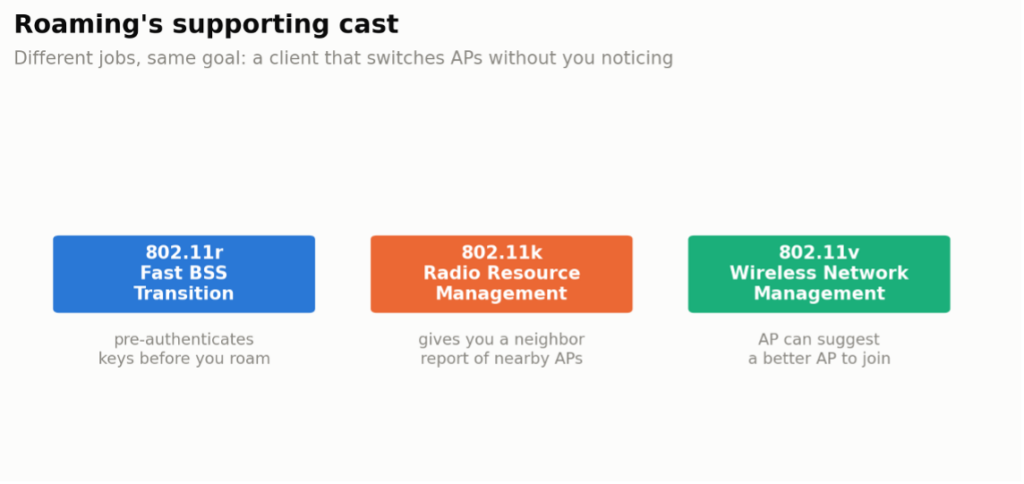
Roaming in Wi-Fi networks allows a device to move seamlessly from one AP to another within the same network without losing its connection. As a device moves through an area covered by multiple APs — like an office, school, or campus — it automatically switches to the AP with the strongest signal, ensuring continuous connectivity. Roaming is essential for maintaining smooth performance in applications like video calls and streaming, as it prevents interruptions that could occur if the device had to reconnect manually.
802.11r also known as Fast BSS Transition (FT), is a Wi-Fi standard that enables faster and more seamless roaming between APs within the same network. With 802.11r, devices can pre-authenticate and establish security keys with nearby APs before moving, significantly reducing the time it takes to transition from one AP to another. This is particularly important for applications that require continuous connectivity, such as voice calls or video streaming, as it minimizes interruptions when users move through a Wi-Fi network, like in large buildings or campuses.
802.11k also known as Radio Resource Management (RRM), is a Wi-Fi standard that enhances roaming efficiency by enabling devices to quickly gather information about nearby access points within a network. When a device is connected to an AP, 802.11k enables it to receive a list of neighbouring APs with details like signal strength and channel usage. This enables the device to make informed decisions about when and where to roam, reducing connection delays and enhancing overall network performance. 802.11k is particularly useful in environments with multiple APs, like offices or campuses, where seamless roaming is essential for user experience.
802.11v also known as Wireless Network Management (WNM), is a Wi-Fi standard that enhances network management and roaming by allowing access points to communicate useful network information to connected devices. With 802.11v, APs can suggest more optimal APs for a device to connect to based on factors like signal strength and network load, helping devices make smarter roaming decisions. This improves network performance and allows devices to maintain a stable connection, especially in environments with multiple APs, such as offices, airports, or campuses. Additionally, 802.11v includes power-saving features that help extend battery life for mobile devices by managing background scanning and connectivity.
6 GHz & Multi-Link Operation
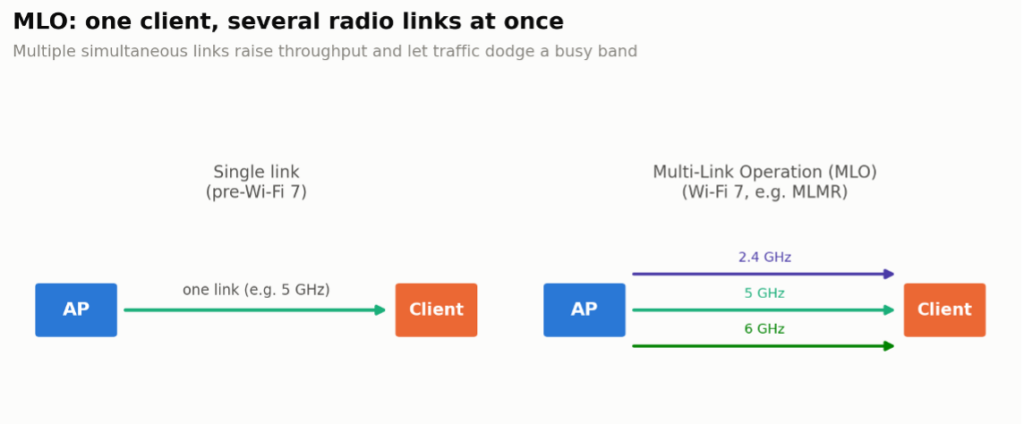
MLMR (Multi-Link Multi-Radio) is part of 802.11be’s Multi-Link Operation (MLO) framework in Wi-Fi 7. With MLMR, a client uses more than one physical radio at once — say, one on 5 GHz and one on 6 GHz — to send and receive simultaneously across both links. That’s the mode that delivers MLO’s headline benefit: genuinely higher aggregate throughput, not just faster failover.
EMLSR (Enhanced Multi-Link Single-Radio) lets a lower-cost client listen for activity on multiple links at once without the extra radio hardware MLMR needs, then commit to whichever single link actually has traffic. It trades away MLMR’s simultaneous-throughput benefit for lower latency and faster link selection on cheaper hardware — a sensible default for phones and other battery/cost-constrained devices.
AFC (Automated Frequency Coordination) system is a key part of the 6 GHz Wi-Fi rule that allows SP Wi-Fi devices to operate in the 6 GHz band without causing interference to licensed users, such as satellite and public safety systems. AFC works by dynamically managing frequency usage, ensuring that Wi-Fi devices only use portions of the 6 GHz spectrum that licensed users do not currently occupy in a given area. This automated system helps optimize spectrum use while protecting other critical services, enabling broader Wi-Fi coverage and better performance in outdoor or large-area deployments using the 6 GHz band.
PSC (Preferred Scanning Channel) are specific channels within the 6 GHz Wi-Fi band that Wi-Fi 6E devices prioritize when scanning for available networks. By focusing on these designated channels, devices can more quickly locate and connect to networks, reducing connection time and enhancing overall efficiency. PSC channels help streamline the network discovery process in the expanded 6 GHz spectrum, particularly in environments with numerous networks, enabling faster and more efficient user connections. PSCs fall on every 4th 20 MHz channel, starting at channel 5:
| PSC channel numbers (6GHz, every 4th 20MHz channel starting at 5) |
| 5, 21, 37, 53, 69, 85, 101, 117, 133, 149, 165, 181, 197, 213 |
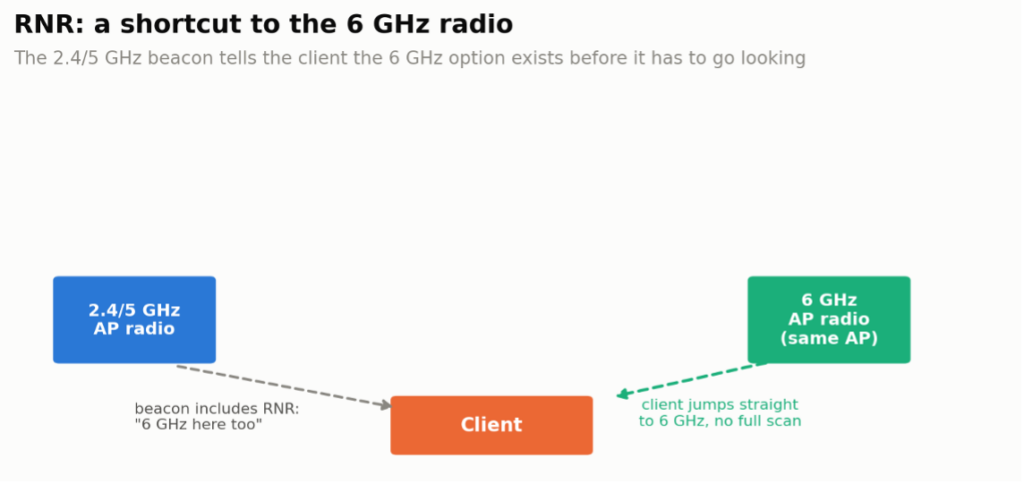
RNR (Reduced Neighbour Report) is a Wi-Fi feature that helps devices discover nearby APs more efficiently, especially in the 6 GHz band. With RNR, an access point in the 2.4 GHz or 5 GHz band can broadcast information about available APs in the 6 GHz band, allowing compatible devices to locate and connect to the optimal AP more quickly. This reduces scanning time, conserves device battery life, and enhances roaming efficiency, providing a smoother and faster connection experience across different Wi-Fi bands.
Channel Access & Contention
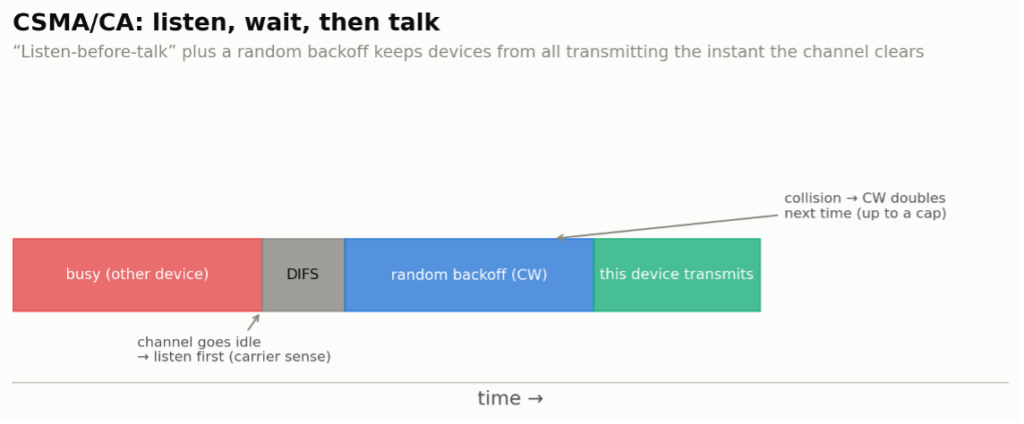
CSMA/CA (Carrier Sense Multiple Access with Collision Avoidance) is a network protocol used in Wi-Fi to prevent data collisions on shared communication channels. Before transmitting data, a device checks if the channel is clear (carrier sense). If the channel is busy, the device waits and tries again after a random delay to avoid interfering with other transmissions. By using the “listen-before-talk” approach, CSMA/CA reduces the likelihood of collisions, enabling multiple devices to share the same network channel efficiently. This protocol is essential for maintaining stable and reliable communication in wireless networks.
CW (Contention Window) is a key component in Wi-Fi networks that defines the time a device waits before attempting to access the wireless channel after detecting it is busy. When multiple devices need to transmit data, they each select a random backoff time within the contention window range, allowing them to avoid collisions by staggering their attempts. If a collision still occurs, the contention window size increases, giving devices a longer time range to choose from, which reduces the likelihood of repeated collisions. The CW mechanism helps manage traffic efficiently, especially in busy Wi-Fi environments.
CCA (Clear Channel Assessment) is a mechanism in Wi-Fi that checks whether a communication channel is free before a device attempts to transmit data. By “listening” to the channel, the device ensures it is not occupied by another transmission, which helps avoid data collisions. This process is often referred to as Listen-Before-Talk (LBT). CCA uses two primary methods: energy detection, which senses raw RF signal strength, and carrier sense, which checks for Wi-Fi-specific signals. If the channel is clear, the device proceeds with transmission; if not, it waits and tries again later. CCA is essential for efficient and orderly communication in shared wireless networks.
SD (Signal Detect) is a function in Wi-Fi systems that identifies the presence of a valid signal on a communication channel. By detecting specific characteristics of Wi-Fi signals, such as modulation patterns, SD helps determine if another device is actively transmitting on the channel. This detection allows a Wi-Fi device to avoid transmitting simultaneously, reducing interference and preventing data collisions. Signal Detect works alongside Clear Channel Assessment (CCA) to ensure efficient and coordinated use of shared wireless channels.
ED (Energy Detect) is a feature in Wi-Fi networks that measures the overall energy level on a communication channel to determine if it is in use. Unlike Signal Detect, which identifies specific Wi-Fi signals, ED detects any signal or interference, including from non-Wi-Fi sources. If the detected energy exceeds a certain threshold, the channel is considered busy, and the device waits before attempting to transmit. ED helps prevent collisions and interference, ensuring smoother communication in environments with multiple wireless devices or sources of electromagnetic interference.
NAV (Network Allocation Vector) is a timer mechanism in Wi-Fi networks that reserves the channel for a specific period to avoid collisions. When a device detects that another device is transmitting, it reads the transmission’s duration information and sets its NAV timer accordingly. During this time, the device refrains from transmitting, allowing the current transmission to complete without interference. NAV helps coordinate access to the shared channel, ensuring orderly communication and reducing the likelihood of data collisions in busy networks.

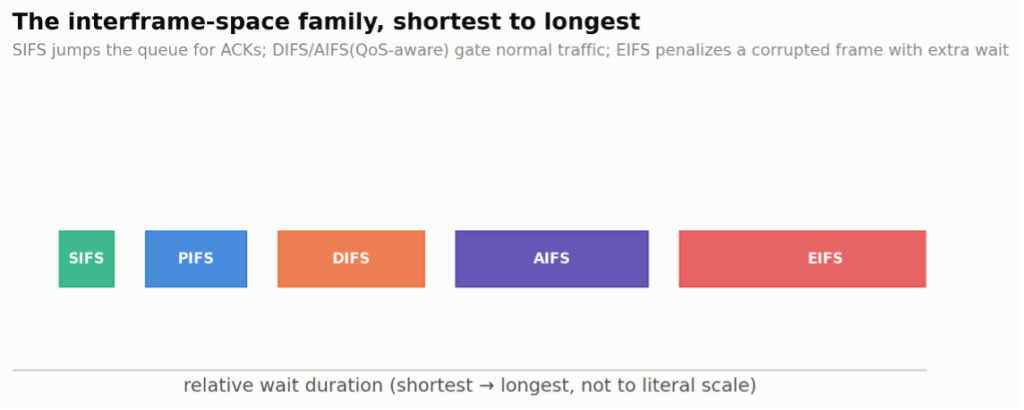
IFS (Interframe Space) is a brief, standardized wait time between data transmissions in Wi-Fi networks. After transmitting, a device waits for an IFS period before allowing another transmission. Depending on the priority of the data, different types of IFS — such as Short Interframe Space (SIFS) and Distributed Interframe Space (DIFS) — are used. This spacing helps prevent collisions by prioritizing certain transmissions, like acknowledgments, and ensures smooth and orderly communication on the shared wireless channel.
SIFS (Short Interframe Space) is the shortest waiting period between data transmissions in Wi-Fi networks, used to give priority to specific types of traffic, such as acknowledgments (ACKs), Clear-to-Send (CTS), and data frames in response sequences. SIFS is essential for time-sensitive communications, ensuring these critical transmissions are completed promptly. By prioritizing specific frames with SIFS, Wi-Fi networks maintain efficient, reliable data flow and reduce the risk of collisions on the wireless channel.
DIFS (Distributed Interframe Space) is a waiting period in Wi-Fi networks used to control wireless channel access. DIFS is longer than SIFS and is required before transmitting standard data frames. After detecting a clear channel, a device waits for a DIFS period before starting its back-off timer to determine when it can transmit. This delay ensures that high-priority frames, such as acknowledgments and control frames that use SIFS, are transmitted first, helping manage traffic and reduce the chances of network collisions.
AIFS (Arbitration Interframe Space) is a customizable waiting period used in Wi-Fi networks, specifically within the Quality of Service (QoS) feature provided by the 802.11e standard. AIFS allows different types of data traffic — such as voice, video, and background data — to have different wait times before accessing the wireless channel. By setting shorter AIFS times for high-priority traffic (such as voice) and longer ones for lower-priority traffic, AIFS helps ensure that critical data is transmitted faster, improving overall network performance and delivering better service quality for time-sensitive applications.
EIFS (Extended Interframe Space) is a longer wait time in Wi-Fi networks after a device detects a corrupted frame, such as one with errors. When a device encounters a corrupted frame, it waits for an EIFS period before attempting to transmit again. This longer delay helps prevent further collisions or interference by giving other devices more time to clear the channel. EIFS is essential for maintaining stability and order in the network, particularly when errors occur, as it helps minimize disruption and ensures more reliable communication.
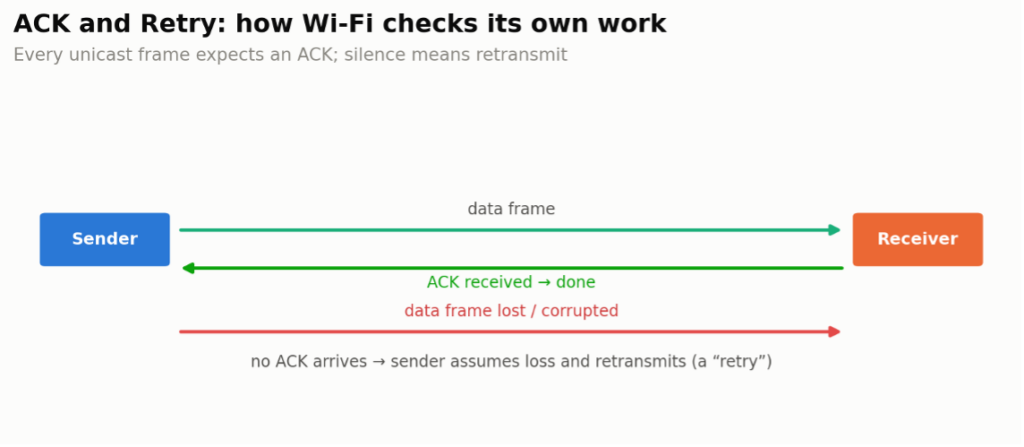
ACK (Acknowledgement) frames are Wi-Fi control frames that confirm a frame’s successful receipt. After receiving a non-broadcast unicast frame, a receiver transmits an ACK back to the sender, confirming that the data arrived intact. If the sender doesn’t receive an ACK, it assumes the data was lost or corrupted and retransmits it. Beyond the basic ACK, Wi-Fi also uses Block ACKs, which acknowledge a whole batch of frames at once instead of one ACK per frame — a big efficiency win once frame aggregation (A-MPDU) entered the picture in 802.11n and beyond. ACK frames are crucial for reliable communication, ensuring that data is correctly received and helping to manage retransmissions, thereby maintaining data integrity within the network.
Retry — in Wi-Fi networks, a retry occurs when a data frame is retransmitted because the sender did not receive an acknowledgment (ACK) from the receiver, indicating that the original transmission was not successfully demodulated. Demodulation failures can result from collisions (timing problems), interference (signal quality problems), or both. Retries are essential for maintaining reliable communication, ensuring data eventually reaches its destination. However, frequent retries can reduce network efficiency and slow performance by consuming additional bandwidth. Managing retries is essential to balancing both data integrity and throughput.
QoS (Quality of Service) is a feature in Wi-Fi and other networks that prioritizes different types of data traffic to improve performance for time-sensitive applications. By assigning higher priority to critical data, such as voice, video, or gaming traffic, QoS ensures that these types of traffic experience minimal delays and interruptions, even when the network is busy. Lower-priority traffic, such as file downloads or background updates, waits longer when necessary. QoS enhances the user experience by optimizing network resources to meet the varying demands of different applications, especially in environments with heavy or mixed traffic.

Slàinte!
Resources
IEEE 802.11-2020 – Specification (Free Download)
IEEE 802.11-2024 – Specification (Free Download)
WFA Generational Wi-Fi User Guide, April 2023
https://www.wi-fi.org/system/files/Generational_Wi-Fi_User_Guide_202304.pdf